
At AI-DAPT, we are developing a set of tools to support the creation of trustworthy, adaptive and data-centric AI solutions. A recurring lesson across AI projects is that successful AI does not start with the model, it starts with the data. Before data can be used for training, testing or analysis, it often needs to be cleaned, transformed, reshaped and converted into meaningful features.
This post introduces the Data Features Toolkit (DFT), the first component presented from the AI-DAPT Data Services area. DFT supports the data pre-processing stage of the AI-DAPT platform by helping users build visual workflows for data transformation and feature engineering before downstream AI tasks.
The Data Features Toolkit
The Data Features Toolkit provides users with feature engineering capabilities during data preparation, before data is used in AI or analytics operations. Its purpose is to help transform available datasets into feature datasets that are better aligned with the needs of target models and analytical tasks. The visual interface allows users to create sequential data pipelines, use functions from a comprehensive library, execute individual steps, and visualise the transformations produced at each stage. By providing a no-code environment, DFT helps bridge the gap between data ingestion and model-ready features, making complex data manipulation more accessible and reproducible.
Feature engineering is one of the most important steps in the AI lifecycle. The way data is represented can strongly influence whether a model is able to learn useful patterns. In practice, this may involve selecting relevant variables, transforming existing columns, encoding categorical values, creating time-based features, reducing dimensionality, aggregating information, or deriving new features from existing data.
DFT supports this process through a visual workflow builder. Users can apply built-in methods for feature selection, extraction and pre-processing, either individually or in combination. These operations can be organised into sequential workflows, allowing users to experiment with different configurations and understand how each step affects the resulting dataset.
👉 Prefer to see it immediately in action? Jump directly to the demo video below.
Turning Feature Engineering into Reusable Workflows
In many AI projects, feature engineering is carried out through project-specific scripts, notebooks or manual experimentation. While this provides flexibility, it can also make the process difficult to reproduce, document and reuse. Important decisions about how data was transformed or which features were selected often remain hidden in code or depend on the experience of individual data scientists.
DFT addresses this by making feature engineering workflows explicit. Users can design and execute a sequence of operations (i.e. the pipeline), inspect the results of each step and preserve the configuration for future use. This creates a clearer record of how the final dataset was produced and makes it easier to reuse or adapt the workflow in future projects. This is particularly valuable in environments, where data scientists, engineers and domain experts may need to understand how data was prepared before it is used in AI or analytics operations.
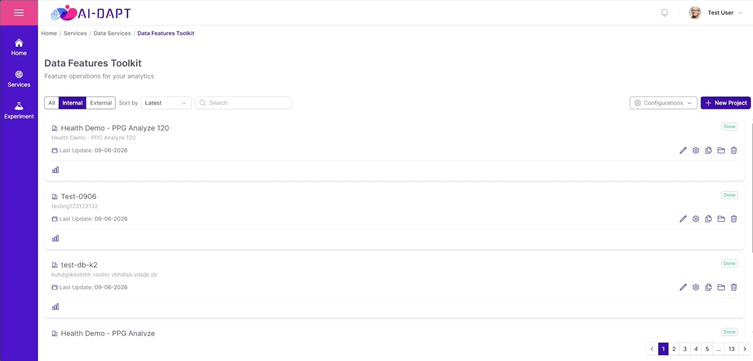
The DFT operates through two main interfaces. The first is the landing page (presented in figure 1), which acts as the central dashboard for managing feature pipeline projects. From this page, users can create new projects, view existing ones, edit details, clone pipelines, delete projects, and search or sort pipelines across the organisation.
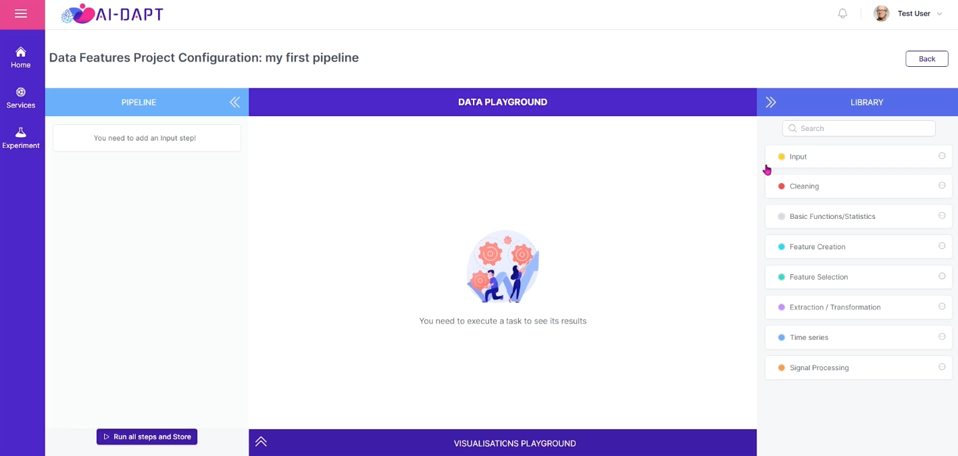
The second is the project configuration workspace, where users define the logic of a feature pipeline. This workspace is divided into four areas:
- the Pipeline panel, where configured blocks are displayed as a sequence of tasks;
- the Data Playground, where users inspect the resulting data frame after each executed step;
- the Visualisations Playground, where data can be visualised based on the current block;
- the Library, which provides the searchable repository of available analytical, transformation and feature engineering methods.
A Rich Library of Configurable Methods
At the core of DFT is a library of configurable methods for data transformation and feature engineering. In its current version, the toolkit provides around 40 methods grouped across eight functional categories supporting a broad range of preparation needs. Users can read datasets, clean and reshape data, apply mathematical transformations, compute statistical summaries, create new features, select relevant variables, transform feature representations, extract time-based patterns and process signal data. These methods can be applied individually or combined into sequential workflows tailored to the dataset and the target AI or analytics task.
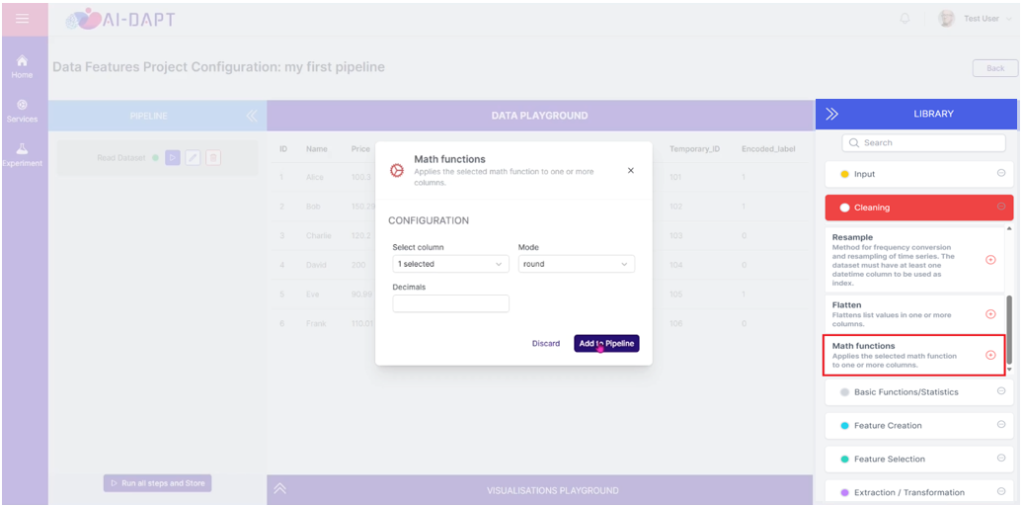
For example, a user may start with an input dataset, apply a mathematical transformation to normalise or reshape selected numerical columns, generate additional features from existing variables, and then use feature selection methods to retain only the most relevant columns for the target model. Each method is added as a block, configured through the interface, and executed as part of the workflow. The example below illustrates this configuration, where a user selects a column, chooses a transformation mode such as rounding, and adds the configured operation to the workflow as a reusable pipeline step.
This block-based approach allows users to build feature engineering logic incrementally. Instead of writing and maintaining separate scripts for each transformation, users can compose, inspect and refine the workflow directly in the DFT environment. The value of this approach is not only the availability of multiple methods, but the possibility to chain them together in a guided and inspectable way, helping users finalise feature datasets that are better prepared for modelling, analytics and downstream AI tasks.
Inspecting Intermediate Results in the Pipeline
A key strength of DFT is that users do not need to wait until the end of the workflow to understand the effect of their data preparation choices. Each block in the pipeline can be executed independently, and once a step has run, the resulting data frame can be inspected directly in the Data Playground.
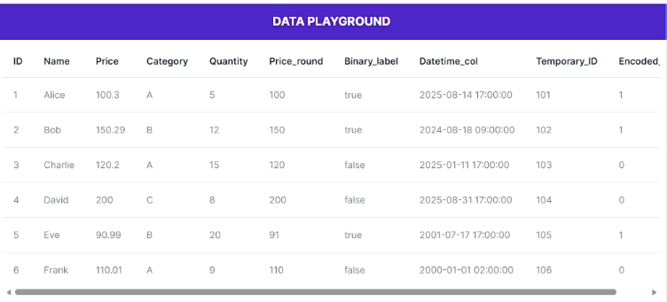
This means that users can follow how the dataset evolves from one step to the next. For example, after applying the round transformation, users can immediately check whether the new column was created as expected (see Figure 4). After selecting, filtering or encoding data, they can verify whether the resulting structure still matches the intended modelling or analytics objective.
This intermediate inspection is particularly important in feature engineering, where small configuration choices can significantly affect the final dataset. Being able to review the output of each step helps users detect unexpected changes early, compare alternative configurations and refine the workflow before executing the full pipeline. The DFT also keeps the results of previously executed blocks available, allowing users to move back and inspect earlier stages without rerunning the entire workflow. This supports a more iterative and controlled approach to data preparation, where feature engineering is not treated as a hidden preprocessing script, but as a transparent sequence of decisions.
From Configured Workflow to Platform Asset
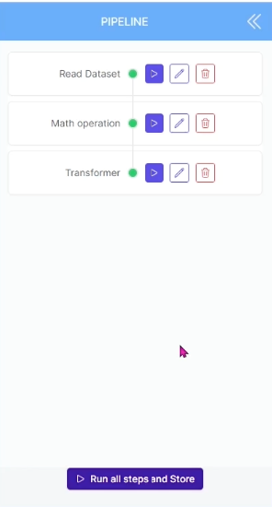
Once users are satisfied with the configured pipeline (Figure 5), DFT allows them to run all steps and store the resulting data frame as a new dataset in the platform. This turns the outcome of feature engineering into an asset that can be reused in downstream AI pipelines, analytics tasks or future data preparation activities.
Watch It in Action 🎥
To bring the Data Features Toolkit component to life, we are releasing a new video that shows it in action. The component is currently being integrated as a core element of the upcoming AI-DAPT platform beta release, demonstrating how users can create a data preparation project, add and configure blocks, execute workflow steps and inspect the resulting dataset.
Note: The UI might change in future AI-DAPT platform relases.